Simulation and Box Models
Lecture 06
September 15, 2025
Review of Last Class
Shallow Lake Model
- Model of phosphorous cycling
- Features complex dynamics: multiple equilibria, feedbacks, bifurcations
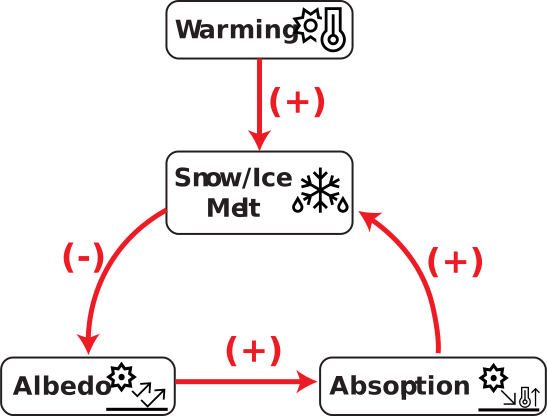
Feedbacks
Unstable equilibria can result from amplifying (positive) feedback loops, where a shock to the system state gets amplified.
Feedback loops can also be dampening (negative), where a shock is weakened (stable equilibria).
Tipping Points and Bifurcations
- Uncertainty about system dynamics can dramatically change equilibria locations and behavior;
- “Shocks” (in this case, sedimentation/recycling disturbances or massive non-point source inflows) can irreversibly alter system outcomes.
Questions?

Text: VSRIKRISH to 22333
Simulating Systems
What is Simulation?
Simulation: evaluating a model to understand how a system might evolve under a particular set of conditions.
- Think of simulation as data generation (or generative modeling).
- The model represents a particular data-generating process.
Why Simulate Systems?
- System involves complex, nonlinear dynamics that may not be analytically tractable.
- Setting up and running a real-world experiment is not possible.
- State depends on prior states or states of nearby locations, so need to iterate over multiple spatial or temporal steps.
- Need to understand range of system performance across rarely-seen conditions.
Types of Simulation Models
- Deterministic vs. Stochastic
- Discrete vs. Continuous
Simulation Model Workflow
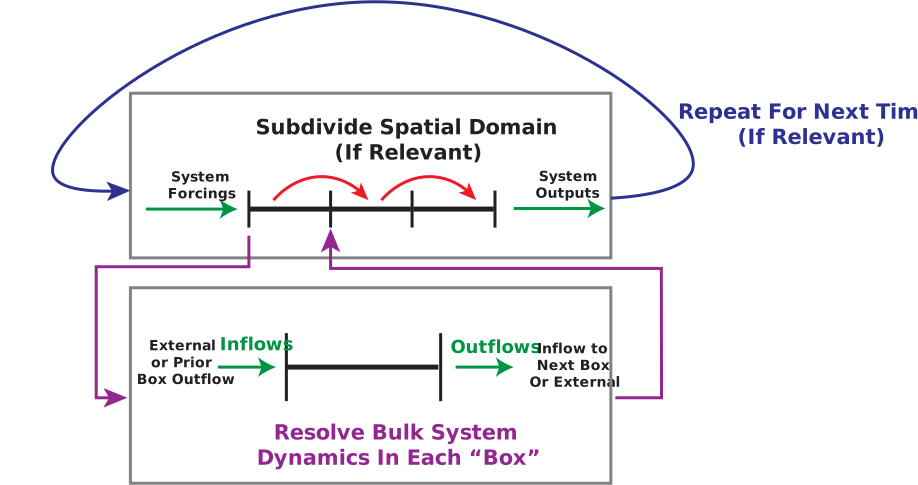
Simulation Workflow
Simulation Model Applications
- Water balance/hydrologic flow models;
- Climate models (ocean heat/CO\(_2\) uptake through “box” layers)
- Airsheds
- Epidemiology
- Social science (agent-based models)
Example: Airsheds
What Is A Box Model?
Box models are a common building block of simulation models.
Box models are all about mass-balance (mass \(m\)), assume well-mixed within box.
Can be steady-state \((\dot{m} = 0)\) or not.
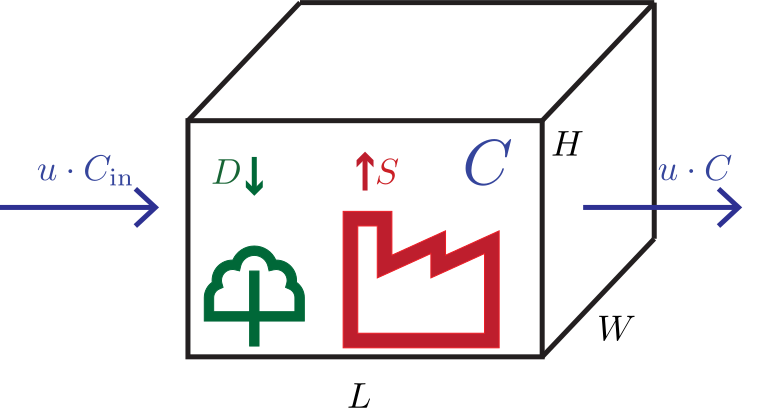
Airshed Model
Let’s look at a simple steady-state model of an airshed.
| Variable | Meaning | Units |
|---|---|---|
| \(m\) | mass of some air pollutant | g |
| \(C\) | concentration in box | g/m\(^3\) |
| \(S, D\) | source, deposition rate within the box | g/s |
| \(u\) | wind speed | m/s |
| \(L, W, H\) | box dimensions | m |
Selecting Box Dimensions
What is relevant for the box dimensions \(L\), \(W\), and \(H\)?
Primarily the assumption(s) about mixing:
- Mixing height: is there an atmospheric inversion which limits mixing height?
- Homogeneity of input/output flows and emissions.
Steady-State Airshed Box Model
Steady-state box ⇒ \(\dot{m} = 0\).
\[\begin{align} 0 &= m_\text{in} - m_\text{out} + S - D \\[0.5em] &\class{\fragment}{{} = (u WH) C_\text{in} - (u WH) C + S - D } \\[0.5em] \end{align}\]
Solving for \(C\): \[C = C_{in} + \frac{S-D}{uWH}\]
Residence Time
Reminder: residence time of a stock \(\omega\) is \[\tau = \frac{\text{Mass}}{\text{Flow}}\]:
For steady-state, this is easy:
\[\begin{align*} \tau &= \frac{C(WHL)}{uCWH} \\ &= \frac{L}{u} \end{align*}\]
Non-Steady State Model
Now let’s assume some process affecting \(m\) depends on time.
For example: let’s say we care about an air pollutant which has a first-order decay rate \(k\), so \(D(t) = D_0 - km(t)\).
\[ \Rightarrow \frac{dm}{dt} = m_\text{in} - m_\text{out} + S - D_0 - km \]
\[ \dot{m} = \frac{d(CV)}{dt} = \overbrace{(u WH) C_\text{in}}^{\text{inflow}} - \overbrace{(u WH) C}^{\text{outflow}} + \overbrace{S - D_0}^{\text{net emissions}} - \overbrace{kCV}^{\text{mass decay}} \]
Non-Steady State Solution
Solution (derivation here): \(C(t) = \color{red}C_0 e^{-lt} \color{black}+ \color{blue}\frac{P}{l}\left(1 - e^{-lt}\right)\)
- Initial condition is transient (decays to zero eventually);
- Concentration converges to a steady-state solution: ratio of inflows \(P\) and outflows \(l\).
Discretizing Continuous Models
We could solve this differential equation, but in general this may not be possible without strong assumptions.
Instead, we can discretize these models using methods from CEE 3200!
Forward Euler Discretization
Recall that \[\frac{df}{dt} = \lim_{\Delta t \to 0} \frac{\Delta f(t)}{\Delta t}.\]
So if we pick a sufficiently small step size \(\Delta t\), can use this as an approximation:
\[\frac{df}{dt} \approx \frac{\Delta f(t)}{\Delta t} = \frac{f(t + \Delta t) - f(t)}{\Delta t}\]
Discretizing the Airshed Model
\[ \frac{dC}{dt} = \frac{u}{L} C_\text{in} - \frac{u}{L} C + \frac{S - D}{V} - kC \\ \]
\[ \frac{C(t+\Delta t) - C(t)}{\Delta t} = \frac{u}{L} C_\text{in} - \frac{u}{L} C(t) + \frac{S - D}{V} - kC(t) \]
\[ \bbox[5px, border: red 5px solid]{C(t+\Delta t) = C(t) + \Delta t \left(\frac{u}{L} \left(C_\text{in} - C(t)\right) + \frac{S - D}{V} - kC(t)\right)} \]
How To Simulate?
- Pick \(\Delta t\);
- Starting at \(t=1\), iterate equation until end-time \(T\).
Note: Forward Euler can suffer from numerical instability or truncation error due to large time steps. Can substitute other numerical integration methods!
Simple Simulation Code
# this function computes the increment by which the concentration
# is updated at each step
function box_simulate_timestep(C, Ci, u, W, H, L, S, D, k)
    return ((u / L) * (Ci - C) + (S - D) / (W * H * L) - (k * C))
end

# this function loops over the timesteps to simulate
# the concentration series
function airshed_simulate(C₀, Ci, u, W, H, L, S, D, k, T, Δt)
    # initialize C storage
    # for code simplicity we make the array length T+1 so
    # index 1 is C₀
    steps = Int64(T / Δt)
    C = zeros(steps + 1)
    C[1] = C₀
    for t = 1:steps
        C[t+1] = C[t] +
            Δt * box_simulate_timestep(C[t], Ci, u, W, H, L, S, D, k)
    end
    # the first element of C is the initial condition
    return C
end
Δt = 1.0
T = 10
C₀ = 0.1
k = 0.3
u = 2
L = 4
W = 4
H = 4
Ci = 0.2
S = 10
D = 13
C = airshed_simulate(C₀, Ci, u, W, H, L, S, D, k, T, Δt)
Simulation Results
Code
p = plot(; xlabel="Time", ylabel=L"Pollutant concentration (g/m$^3$)")

# find exact solution and plot for comparison
# need these substitutions for the exact solution; not critical otherwise
V = 4^3
P = (u / L) * Ci + (S - D) / V
l = (u / L) + k
# use steps of 0.01 to smooth the plotting
C₁ = C₀ .* exp.(-l * (0:0.01:T))
C₂ = (P / l) * (1 .- exp.(-l * (0:0.01:T)))
C_exact = C₁ .+ C₂
plot!(p, 0:0.01:T, C_exact, linewidth=3, color=:black, label="Exact Solution")

# add simulated solution
plot!(p, 0:Δt:T, C, linewidth=3, color=:blue, label="Simulated Solution (Δt = 1)")Impact of Time Step Size
Code
Csmall = airshed_simulate(C₀, Ci, u, W, H, L, S, D, k, T, 0.1)
plot!(p, 0:0.1:T, Csmall, linewidth=3, color=:purple, label="Simulated Solution (Δt = 0.1)")
Csmaller = airshed_simulate(C₀, Ci, u, W, H, L, S, D, k, T, 0.01)
plot!(p, 0:0.01:T, Csmaller, linewidth=3, color=:orange, label="Simulated Solution (Δt = 0.01)")Time-Varying (Dynamic) Simulation
In our prior example, inflow conditions were static (often an assumption needed for analytic solutions).
The simulation framework lets us make these time-varying:
\[ \begin{aligned} C(t+\Delta t) &= C(t) + \\ & \qquad \Delta t \left(\frac{{\color{red}u(t)}}{L} \left({\color{red}C_\text{in}(t)} - C(t)\right) + {\color{red}S(t)} - {\color{red}D(t)} - kC(t)\right) \end{aligned} \]
Dynamic Simulation Code
function airshed_simulate_dynamic(C₀, Ci, u, W, H, L, S, D, k, T, Δt)
    # initialize C storage
    # for code simplicity we make the array length T+1 so
    # index 1 is C₀
    steps = Int64(T / Δt)
    C = zeros(steps + 1)
    C[1] = C₀
    for t = 1:steps
        C[t+1] = C[t] + Δt * box_simulate_timestep(C[t], Ci[t], u[t], W, H, L, S, D, k)
    end
    # the first element of C is the initial condition
    return C
end
Dynamic Inputs
Code
Δt = 0.1
steps = Int(T / Δt) + 1
u = rand(LogNormal(log(2), 0.05), steps)
Ci = rand(LogNormal(log(0.2), 0.1), steps)

pwind = plot(0:Δt:T, u; title="Wind Speed", size=(550, 450), xlabel="Time", ylabel="m/s")
pincoming = plot(0:Δt:T, Ci; title="Incoming Concentration", size=(550, 450), xlabel="Time", ylabel=L"$\mathrm{g/m}^3$")

display(pwind)
display(pincoming)Dynamic Simulation Results
Code
Cdynamic = airshed_simulate_dynamic(C₀, Ci, u, W, H, L, S, D, k, T, 0.1)
p = plot(; xlabel="Time", ylabel=L"Pollutant Concentration ($\mathrm{g/m}^3$)")
plot!(p, 0:0.1:T, Cdynamic, linewidth=3, color=:purple, label="Dynamic Simulated Solution")
plot!(p, 0:0.1:T, Csmall, linewidth=3, color=:red, label="Static Simulated Solution")Multi-Box Simulation
More Complex Domains
We can use the single box simulation as a building block for more complex domains, possibly with different dynamics.
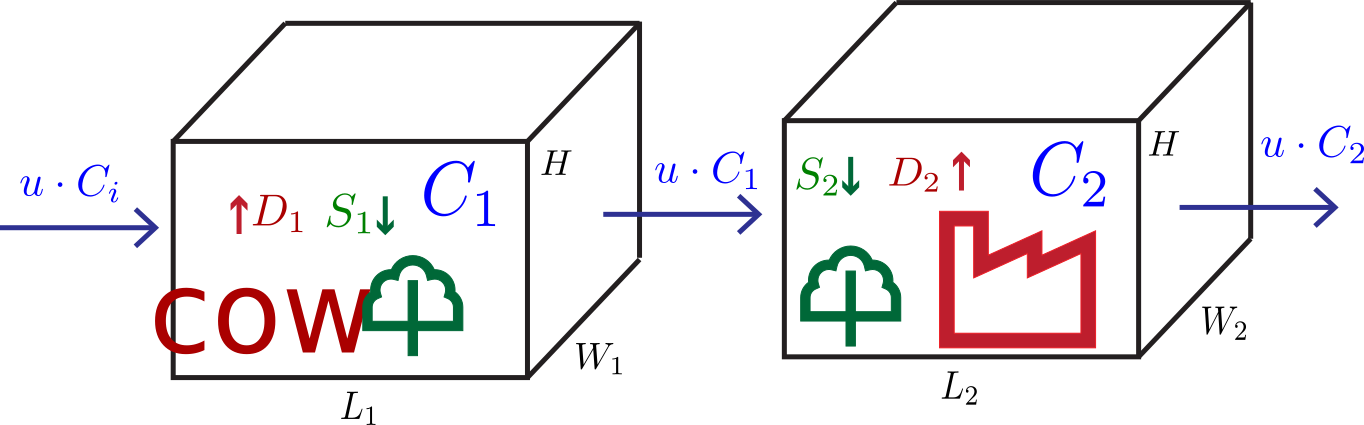
Two box airshed model
Multi-Box Simulation Approach
Tip: Use smaller functions as a building block!
Multi-Box Simulation Approach
# here we use our timestep function on each box individually,
# but update them "together"
function airshed_twobox_simulate(C1₀, C2₀, Ci, u, W1, W2, H1, H2, L1, L2, S1, D1, S2, D2, k, T, Δt)
    # initialize C storage
    # for code simplicity we make the array length T+1 so
    # index 1 is C₀
    steps = Int64(T / Δt)
    C1 = zeros(steps + 1)
    C2 = zeros(steps + 1)
    C1[1] = C1₀
    C2[1] = C2₀
    # for each time step, first we update box 1, then box 2
    for t = 1:steps
        C1[t+1] = C1[t] + Δt * box_simulate_timestep(C1[t], Ci, u, W1, H1, L1, S1, D1, k)
        C2[t+1] = C2[t] + Δt * box_simulate_timestep(C2[t], C1[t+1], u, W2, H2, L2, S2, D2, k)
    end
    return (C1, C2)
end
Two-Box Simulation Results
Code
Δt = 0.1
T = 10
C1₀ = 0.05
C2₀ = 0.1
k = 0.3
u = 2
W1 = 6
H1 = 6
L1 = 6
W2 = 4
H2 = 4
L2 = 4
Ci = 0.01
S1 = 30
D1 = 20
S2 = 10
D2 = 13
C = airshed_twobox_simulate(C1₀, C2₀, Ci, u, W1, W2, H1, H2, L1, L2, S1, D1, S2, D2, k, T, Δt)

p1 = plot(0:0.1:T, C[1], linewidth=3, color=:purple, xlabel="Time", ylabel=L"Concentration ($\mathrm{g/m}^3$)", title="Box 1", size=(600, 500))
p2 = plot(0:0.1:T, C[2], linewidth=3, color=:red, xlabel="Time", ylabel=L"Concentration ($\mathrm{g/m}^3$)", title="Box 2", size=(600, 500))
display(p1)
display(p2)Key Takeaways and Schedule
Key Takeaways
- Simulation modeling involves using a model to generate “data” under certain conditions.
- Simulations are the main approach to descriptive modeling.
- Divide domain into spatial domains and/or temporal steps and iterate.
- Numerical vs. Analytic Integration
Next Classes
Wednesday: Dissolved Oxygen Simulation
Assessments
Homework 2: Assigned, Due 9/25 at 9pm
Reading: Oreskes et al. (1994)
Appendix
Non-Steady State Model Solution
\[\begin{gather} \dot{m} = \frac{d(CV)}{dt} = \overbrace{(u WH) C_\text{in}}^{\text{inflow}} - \overbrace{(u WH) C}^{\text{outflow}} + \overbrace{S - D}^{\text{net emissions}} - \overbrace{kCV}^{\text{mass decay}} \\[0.5em] \frac{dC}{dt} = \underbrace{\frac{u WH}{V} C_\text{in} + \frac{S - D}{V}}_{\Large =P} - \underbrace{\left(\frac{u WH}{V} + k\right)}_{\Large =l} C \\[0.5em] \frac{dC}{dt} = P - l C \end{gather}\]
Non-Steady State Model Solution
\[\begin{gather} \frac{dC}{dt} = P - l C \\[0.5em] \int \frac{dC}{P-lC} = \int dt \\[0.5em] -\frac{1}{l} \ln\left(P-lC\right) = t + A \\[0.5em] \underbrace{C(0) = C_0}_\text{initial condition} \Rightarrow A = -\frac{1}{l} \ln\left(P-lC_0\right) \end{gather}\]
Non-Steady State Solution
\[\begin{gather} -\frac{1}{l} \ln\left(P-lC\right) = t - \frac{1}{l} \ln\left(P-lC_0\right) \\[0.5em] -\frac{1}{l} \ln\left(\frac{P-lC}{P-lC_0}\right) = t \\[0.5em] C = -\frac{1}{l} \left(P - e^{-lt}\left(P-lC_0\right)\right) \\[0.5em] C(t) = C_0 e^{-lt} + \frac{P}{l}\left(1 - e^{-lt}\right) \end{gather}\]
References
References
Oreskes, N., Shrader-Frechette, K., & Belitz, K. (1994). Verification, validation, and confirmation of numerical models in the Earth sciences. Science, 263, 641–646. https://doi.org/10.1126/science.263.5147.641